Update hundreds of WordPress files in one reviewed batch.
Drop in the replacement files, review the matches that need attention, then run the batch when you are ready. Backups and rollback are built in.
Example question: “How do I replace 200 PDFs without doing them one by one?” Answer: 200 files — Bring the whole batch in at once. Matched — It works out which file goes where. 18 to review — Check the ones it is unsure about, then replace. Example question: “Can I update this PDF without breaking the links?” Answer: New file — Swap the document itself. Same file, swapped — The page keeps pointing at it. Links keep working — Nobody has to update a URL. Example question: “Our filenames change every semester. Can it remember the matches?” Answer: Match once — Tell it where the file belongs. Remember it — Pro remembers where that file goes. Less cleanup next time — Recurring batches get easier.
- No artificial batch limits in Free
- A backup before every change
- Nothing replaced until you approve
The old way
200 PDFs. One handbook update.
- Find each post that links the old file
- Upload, rename, re-link, repeat
- Hope you didn’t miss one
With WP Bulk Replace
One batch. One review. One approval.
- Drop the files in as a batch
- Check only the matches that need you
- Replace everything, originals kept
How it works
From a folder of files to a finished update in four steps.
-
- qv-18-actuator-manual-rev2.pdf
- qg-5-gas-detector-manual-v2.pdf
- + 7 more
Upload
Drop the whole batch in at once.
-
- QG-5 Gas DetectorHigh 94%
- QU-90 UltrasonicHigh 93%
- QA-7 pH AnalyzerMedium 82%
Match
Likely destinations found for you.
-
- 6 matched
- 3 heldNeeds review
- You decide
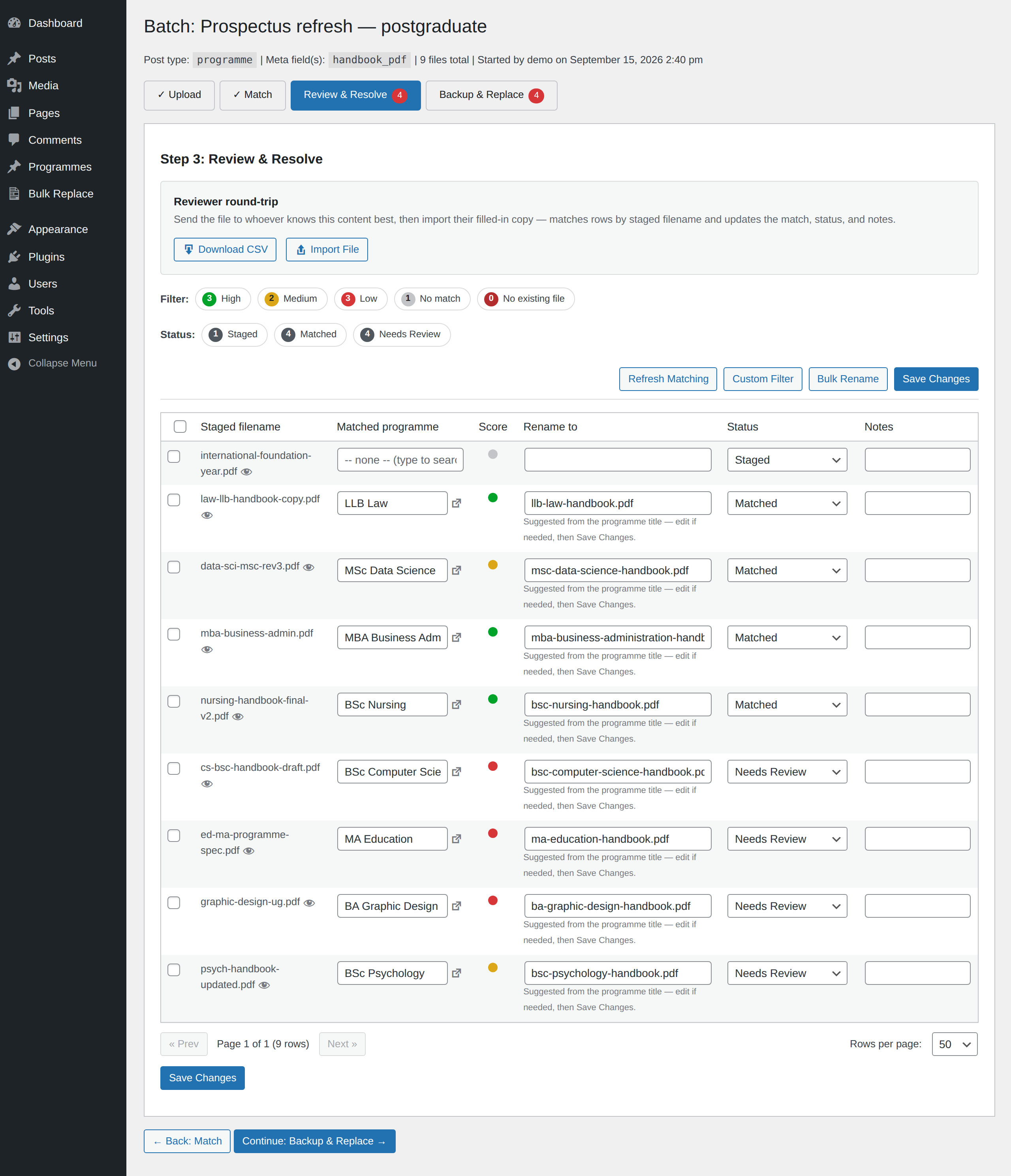
Review & resolve
The uncertain ones wait for you.
-
- Backup kept✓
- Replaced✓
- Rollback ready
Backup & replace
Originals kept, then swapped.
6 matched · 3 held. Nothing replaced until you approve.
See what you’re approving
Every match, graded. Every decision yours.
See where every file will go before anything changes. WP Bulk Replace suggests matches, shows confidence scores, and holds uncertain results for your review.
Pro
Teach it once. Pro remembers.
Handle recurring file updates faster. Pro remembers the matches you correct, and also finds files used in ACF fields and WooCommerce products.
FIN-DEPTFinance Department
Remembered for the next batchAI Assistant
Tell it what needs replacing. See exactly what would change.
Describe the job in plain English. The Assistant creates the batch, uploads and matches your files and prepares the change, showing you exactly what would be updated so you can review it.
Requires Pro. Preview it with your Pro licence before you add the add-on.

Add-ons
Built for how you work, wherever your files live.
-
Multisite Add-on
Update every site in your network from one screen.
Upload once, review matches for every site together, and replace everywhere — with a backup on each site.
Explore Multisite -
Cloud Storage Add-on
Offsite backups you control. Cloud files you can finally replace.
Verified copies in your own bucket, and safe replacement of files already stored in your cloud bucket.
Explore Cloud Storage -
Enterprise Storage Beta
Bulk replacement for enterprise-managed hosting.
Built for platforms such as WordPress VIP and Altis, with your host holding the keys.
Start free in Beta -
AI Assistant, API and MCP Add-on
Ask in plain words. Review the plan.
Chat in WordPress, with MCP and the REST API for your own tools.
Learn more
Made for teams that keep large file libraries current.
Agencies
Client sends a folder of updates? Replace the batch, then reuse your corrected matches next time.
Higher education
Handbooks, course documents, departmental forms and schedules.
Associations & nonprofits
Member documents, reports, applications, annual updates.
Government sites
Policies, agendas, forms — where links should keep working.
Publishers & stores
Downloadable material that changes without a page rebuild.
One large site
Hundreds of files on one site? That’s exactly the job.
Nothing replaced until you approve
You see every match first. Uncertain ones are held for your decision.
A backup before every change
Originals are kept, so you can go back.
Rollback when you need it
Undo a replacement from the same screen. Brand-new files can be added in the same batch.